
Role: Lead Product Designer
Timeline: 6 weeks
Platform: Mobile and Desktop
Renolution is a premium service that helps you find the perfect contractor for your home project. They carefully match clients with trusted professionals, ensuring a smooth and stress-free experience from start to finish.
The company behind Renolution is MOSS, a leading firm in the renovation industry, based in Virginia. Known for its innovation solutions and extensive network of vetted contractors. MOSS leverages its expertise and resources to power Renolution, enhancing the efficiency and quality of home renovation projects.
The problem
The booming renovation market has led to a situation where many skilled contractors are fully booked up to a year, leaving home owners frustrated and without timely options.
Contractors who are overwhelmed with work are forced to turn away lucrative projects, missing out on potential earnings. MOSS saw a chance to revolutionize this by establishing a referral network. Overbooked contractors can refer projects to MOSS, who then matches these projects with available, highly qualified contractors in their network. The system is a win-win: the referring contractor earns a referral fee, MOSS takes a percentage of the project fee, and the project contractor receives the remaining amount. This approach ensures homeowners get prompt service, contractors maximize their earnings, and MOSS efficiently coordinates the workflow.
The goal
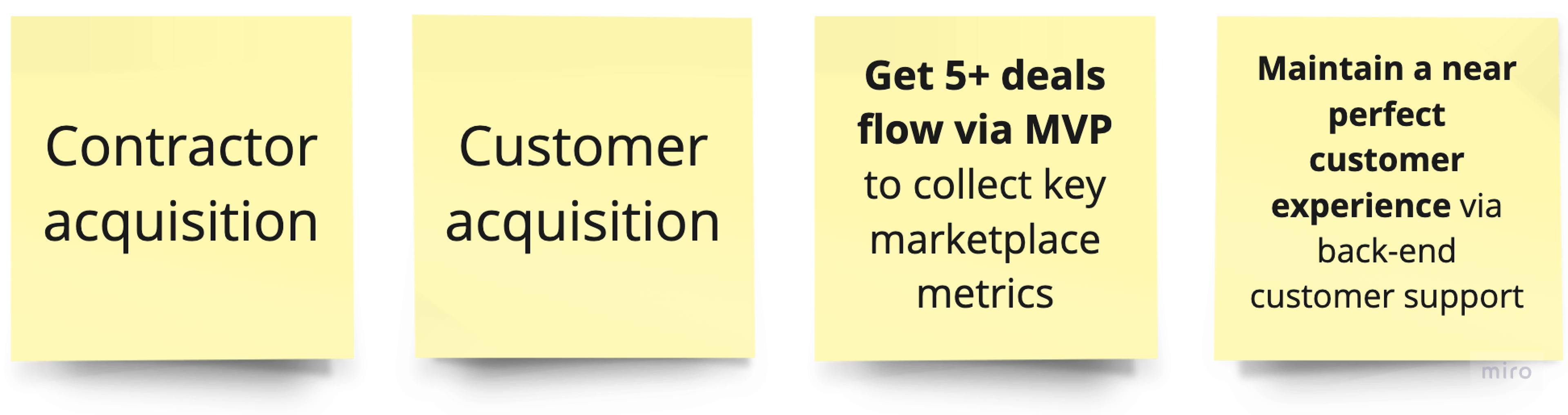
Our goal was to rapidly launch an MVP in 6 weeks to validate market assumptions, gather actionable user feedback, and set the stage for future revenue growth.
By achieving this fast delivery, we aimed to not only refine the product based on real user feedback but also to position MOSS for increased revenue. The timely launch would allow MOSS to enter the market quickly, seize new opportunities, and optimize the product to better meet user needs, ultimately driving higher engagement and revenue growth.
Since we were developing this product from the ground up, there was no existing performance benchmarks or user data to guide our initial metrics. As a result, our focus was on establishing a foundational understanding of user behaviour and product effectiveness through early feedback and real-time data collection.
Since we were developing this product from the ground up, there was no existing performance benchmarks or user data to guide our initial metrics. As a result, our focus was on establishing a foundational understanding of user behaviour and product effectiveness through early feedback and real-time data collection.
Core outcomes
My Role
I was the only product designer for this project, working with 1 product manager and 4 developers from Amsterdam.
In a fast-paced 6-week project for Renolution, I was tasked with designing a minimum viable product (MVP) to quickly test market fit. The tight deadline required me to work at an accelerated pace, outpacing the development team to ensure timely delivery. Given that the developers were based in our Amsterdam branch, I needed to work even faster to complete my tasks before their workday started. This tight coordination was crucial to keep the project on track and meet our launch goals.
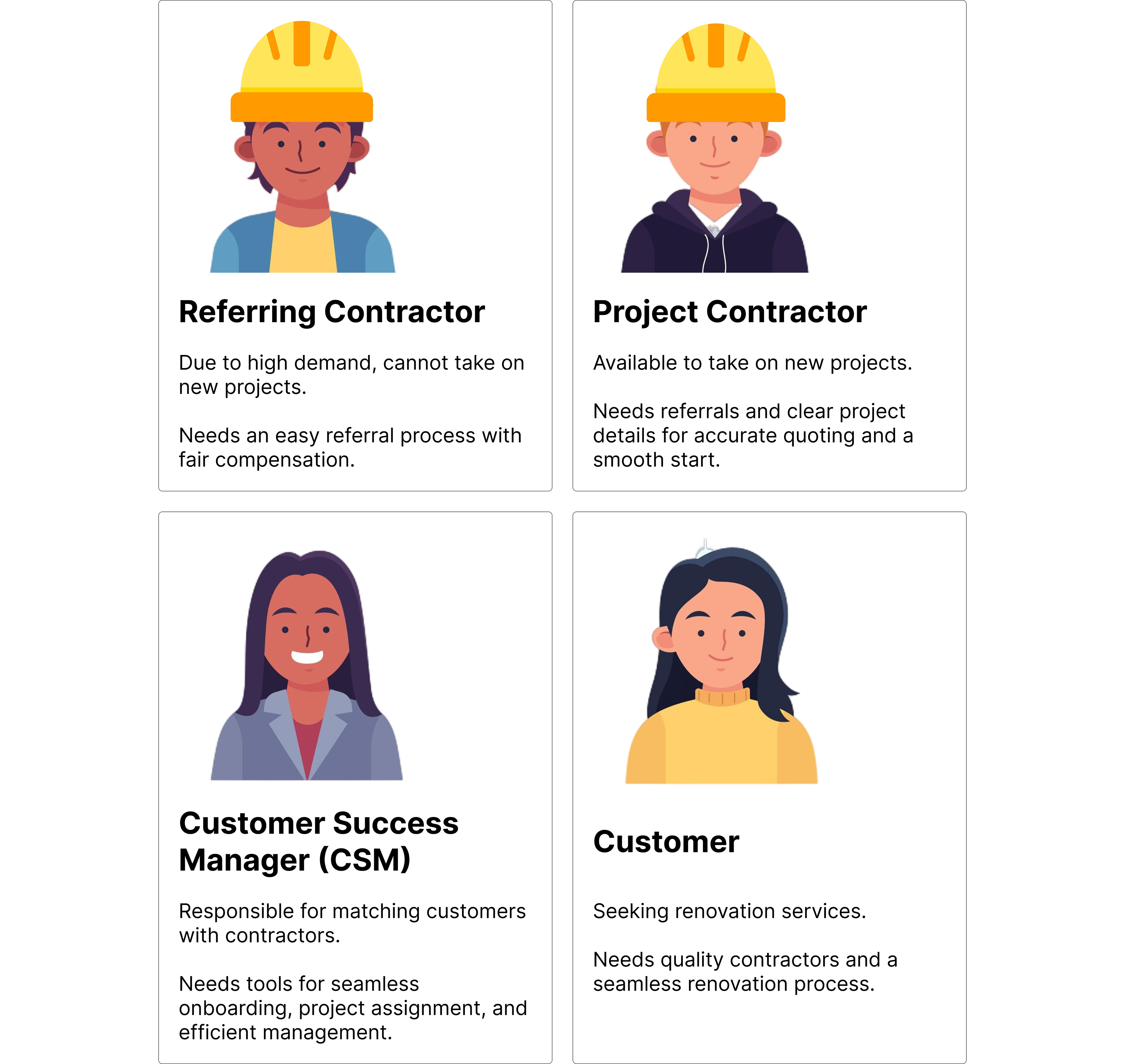
User Personas
To ensure the MVP of Renolution delivered maximum value, I conducted a strategic analysis of user personas.
By identifying and understanding the different user personas, it would help us map out their journeys and interactions with the application. This approach would enable us to pinpoint critical areas for prioritization, focusing on features that would deliver the greatest impact and effectively address user needs in the initial release.
Creating user mapping based on assumptions
With limited insights into the desired user journeys, the product manager and I created a preliminary user map before our first client call. This helped clarify questions and ensured a focused meeting to address any confusion early on.
With limited insights into the desired user journeys, the product manager and I created a preliminary user map before our first client call. This helped clarify questions and ensured a focused meeting to address any confusion early on.
The user map insights was based on the project brief provided by the sales team and CEO.



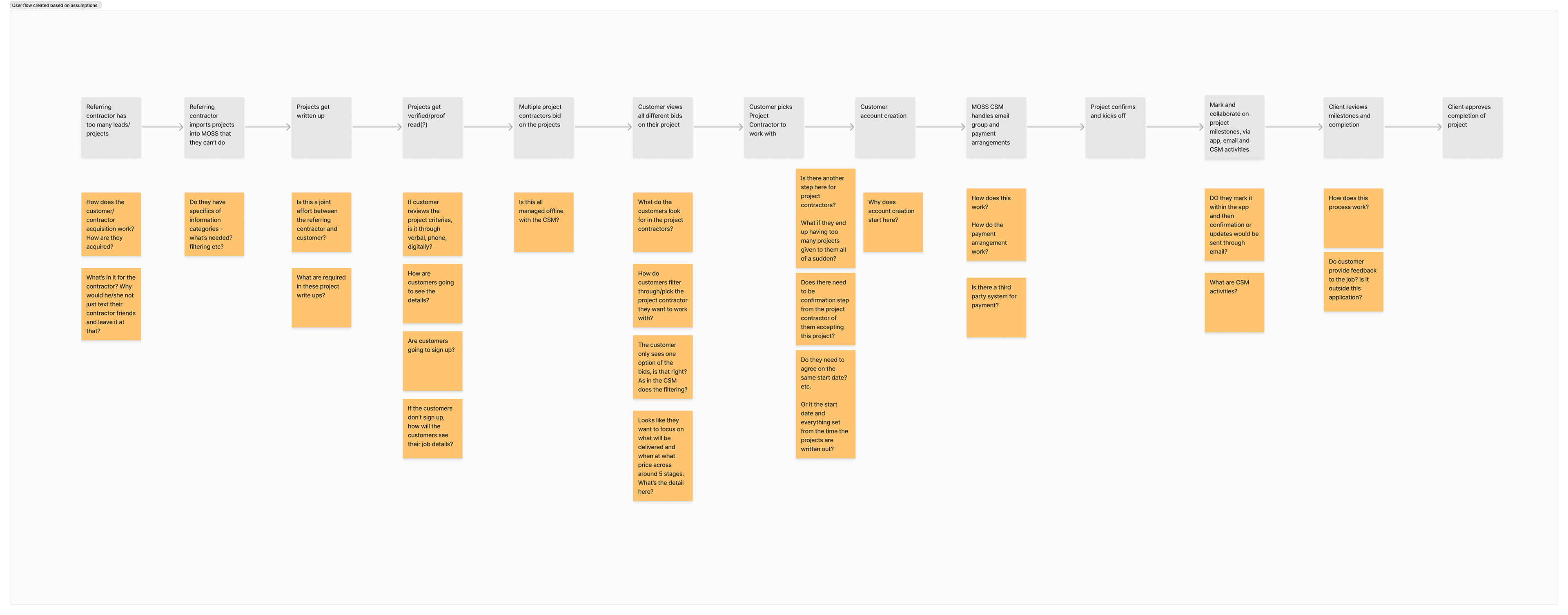

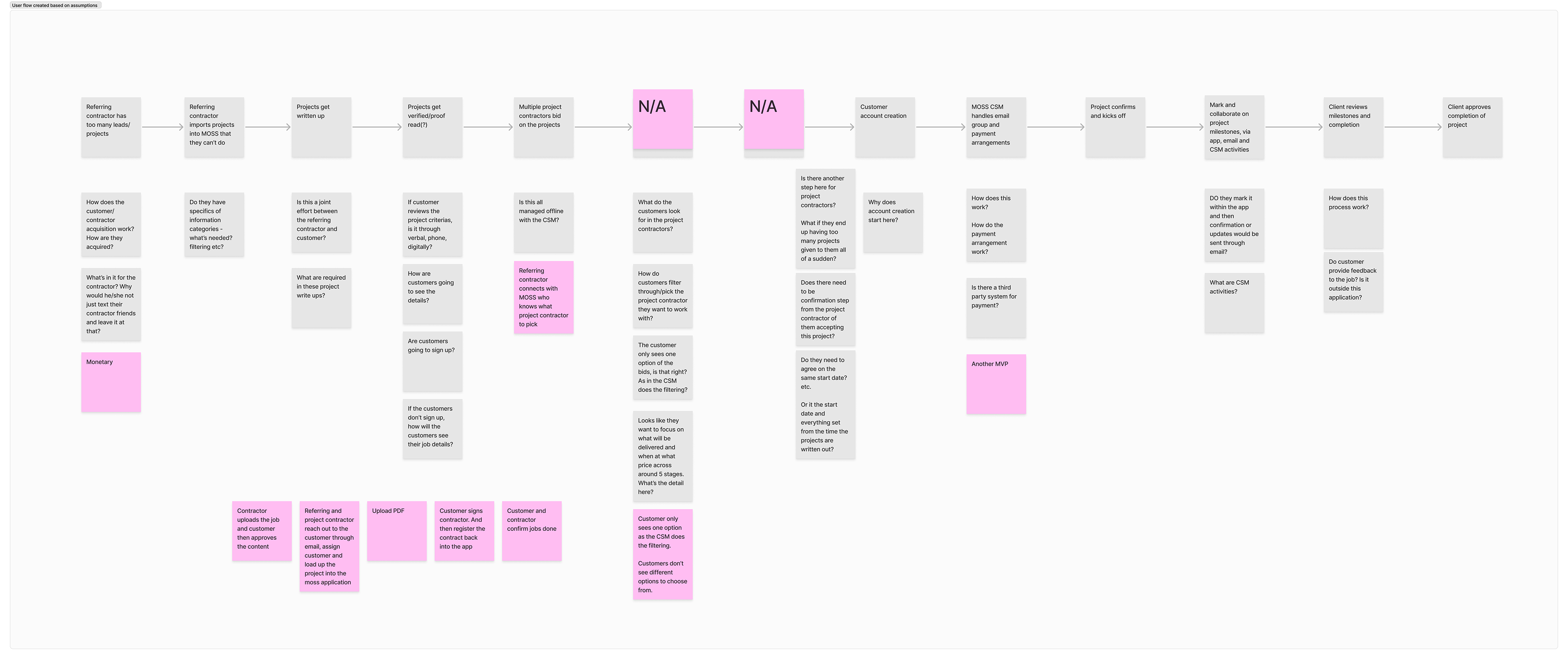
Some questions remained unresolved, but we anticipated gaining clarity as we tackled those features later in the process.
Sprint planning
During sprint planning, we prioritized 'jobs to be done' with the client and adapted tasks as needed to align with evolving insights and project goals.
During sprint planning, we prioritized 'jobs to be done' with the client and adapted tasks as needed to align with evolving insights and project goals.
This approach ensured that the features we developed directly addressed users' core needs and aligned with business objectives, resulting in a more targeted and effective product.
Using user maps, we strategically targeted and drove key behaviours:
•Ensuring seamless onboarding and project assignment for Customer Success Managers
•Simplifying project referrals for Referring Contractors
•Enabling accurate quoting and project completion for Project Contractors
•Promoting smooth platform engagement for Customers
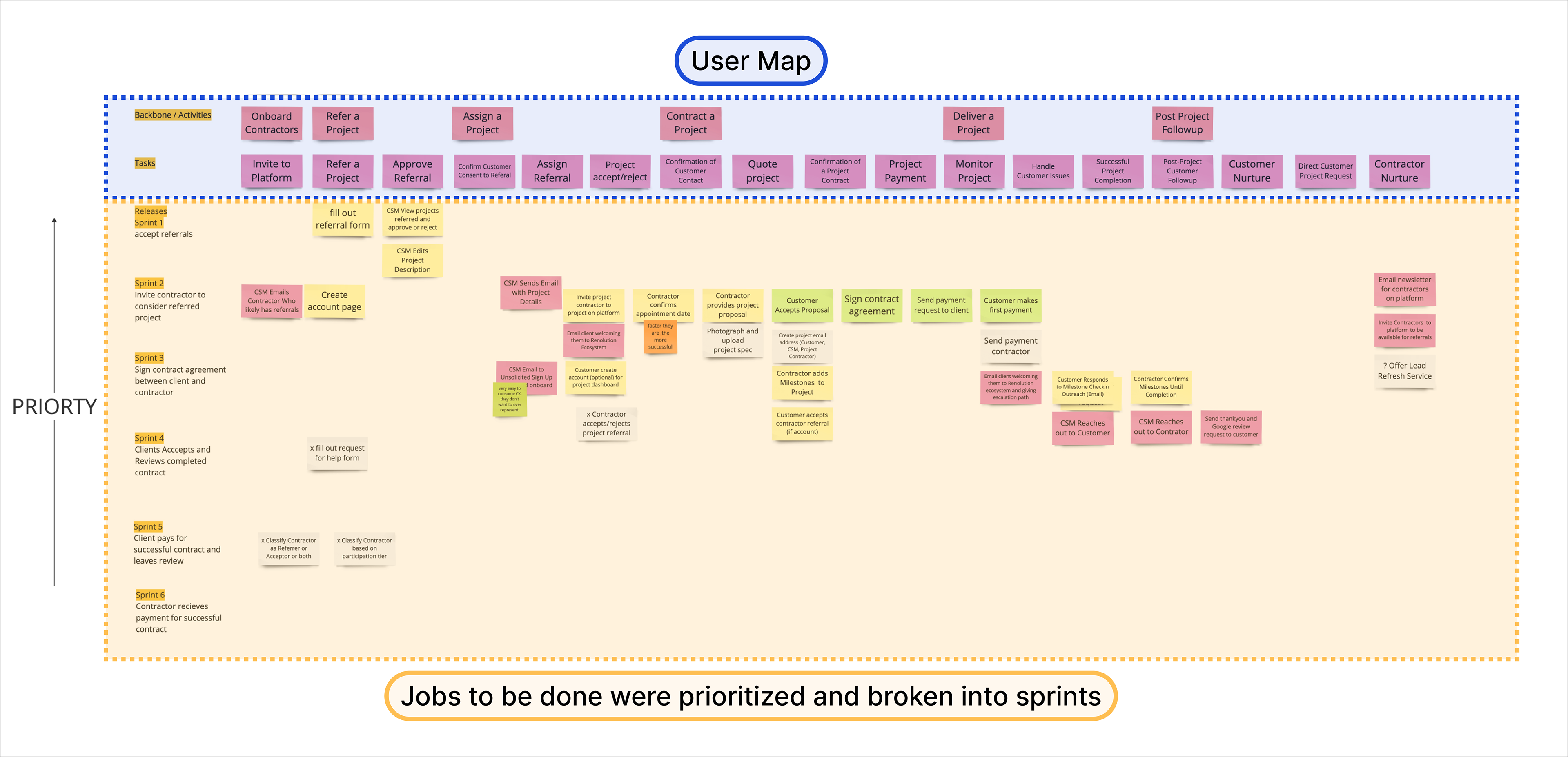
We defined jobs to be done for each sprint, aligning them with user map tasks. By prioritizing these jobs and staying flexible, we adjusted as new insights emerged, ensuring alignment with client needs and project goals.
User mapping
After prioritizing 'jobs to be done', I mapped the key features across user personas to ensure a seamless experience within the product.
After prioritizing 'jobs to be done', I mapped the key features across user personas to ensure a seamless experience within the product.
This step allowed us to see the entire user journey, ensuring that the features work together cohesively and support a seamless experience. The user map also serve as a vital tool for cross-functional collaboration, helping the team stay aligned and informed as the product evolved. By combining "jobs to be done" with a user map, we ensured that our development efforts were both strategic and user-focused ultimately driving more effective and impactful results.

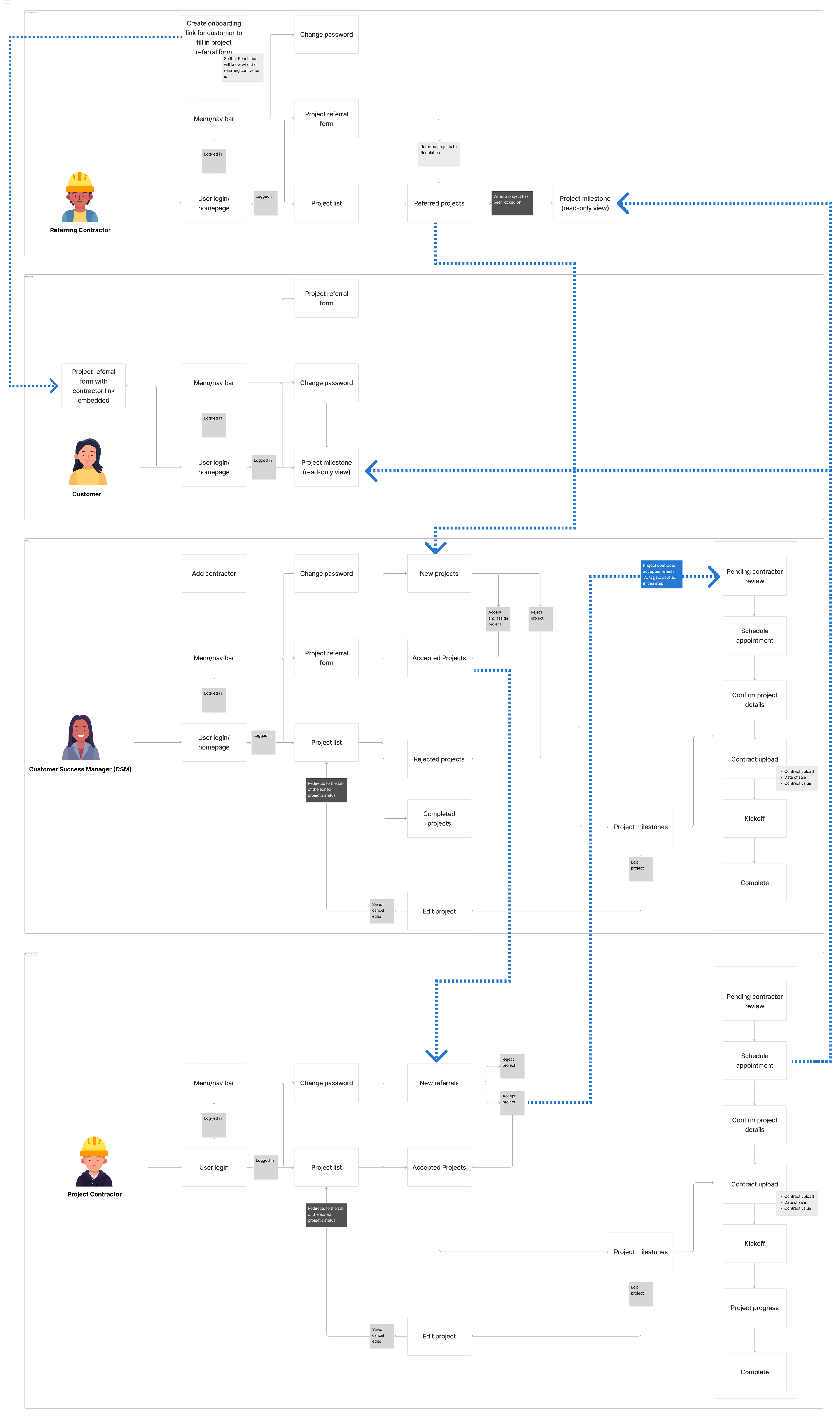
Sprint 1-2
In sprint 1-2, I focused on key tasks for essential project setup to establish a solid foundation for validating core functionalities.
In sprint 1-2, I focused on key tasks for essential project setup to establish a solid foundation for validating core functionalities.

These tasks were ideal for Sprint 1 because they addressed critical functionalities that would directly impact user experience and operational efficiency. By focusing on these foundational tasks, I'm able to establish a working system that allowed us to test core processes early, gather feedback, and iteratively improve the application. This approach not only set a strong groundwork for future development but also helped validate essential features with real users, ensuring that subsequent sprints could build on a solid base.
Filling out referral form
I prioritized the referral form to capture essential project details using MOSS's questionnaire. I inquired about submission rates and drop-off to understand potential survey fatigue, despite only receiving general feedback.
I prioritized the referral form to capture essential project details using MOSS's questionnaire. I inquired about submission rates and drop-off to understand potential survey fatigue, despite only receiving general feedback.
I noted that the survey is quite lengthy and text-heavy, which could lead to survey fatigue. To address this, I focused on identifying and prioritizing essential questions by asking questions:
1. Which questions are crucial for capturing necessary information and why?
2. Which questions can be removed without losing essential detail?
3. Are the terms clear and understandable to the users filling this form?
4. What are the form's visit and drop-off rates, and how does its conversion look?
Although I sought specific feedback on submission rates and drop-off, I received only general insights about submission volume. As a result, we concentrated on refining the form by focusing on key fields and enhancing usability to reduce user fatigue.
1. Which questions are crucial for capturing necessary information and why?
2. Which questions can be removed without losing essential detail?
3. Are the terms clear and understandable to the users filling this form?
4. What are the form's visit and drop-off rates, and how does its conversion look?
Although I sought specific feedback on submission rates and drop-off, I received only general insights about submission volume. As a result, we concentrated on refining the form by focusing on key fields and enhancing usability to reduce user fatigue.
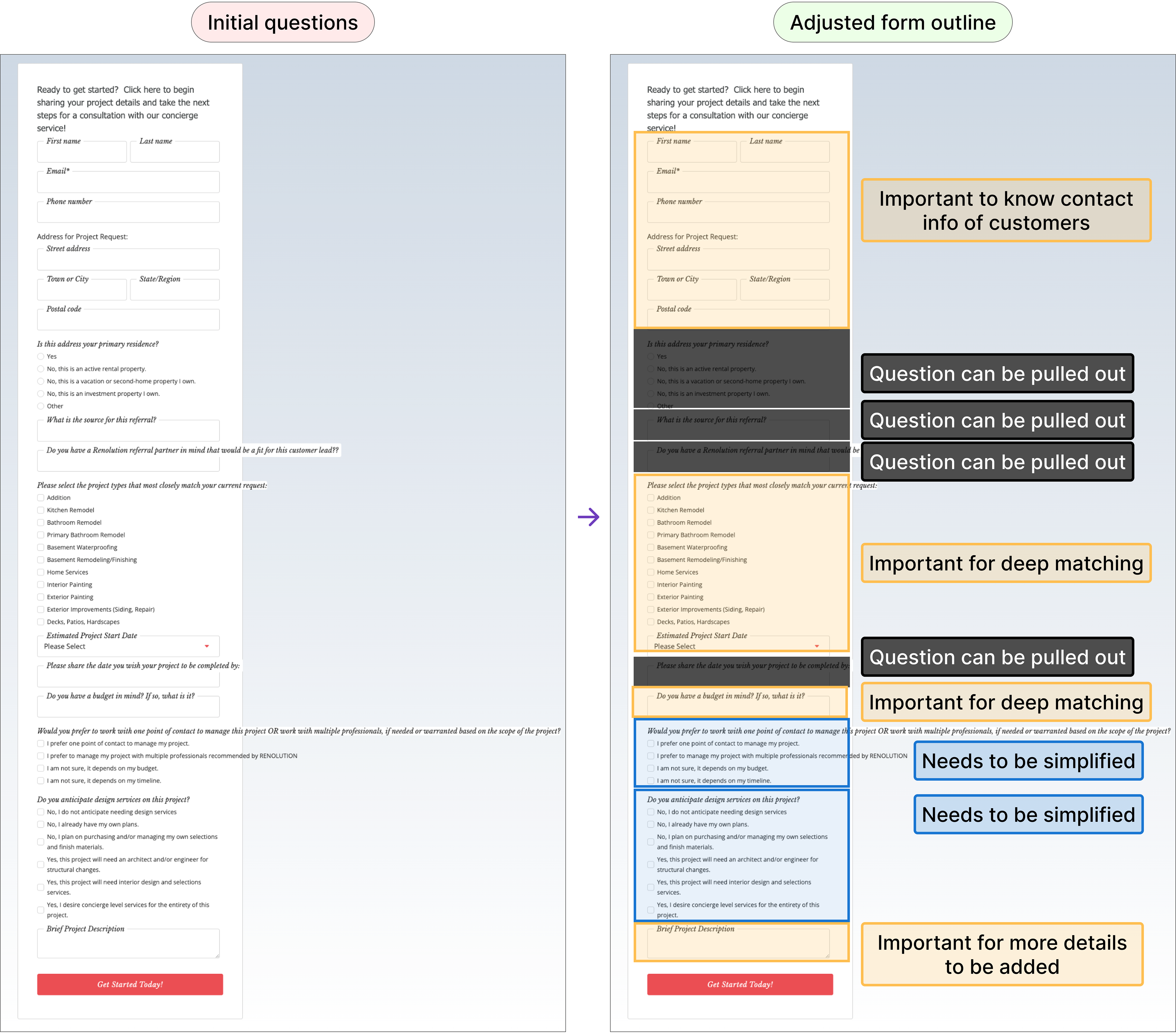
I analyzed competitor questionnaires from renovation platforms to ensure our questions optimized the capture of essential project details.
An example is how competitors handled the question of project start dates.
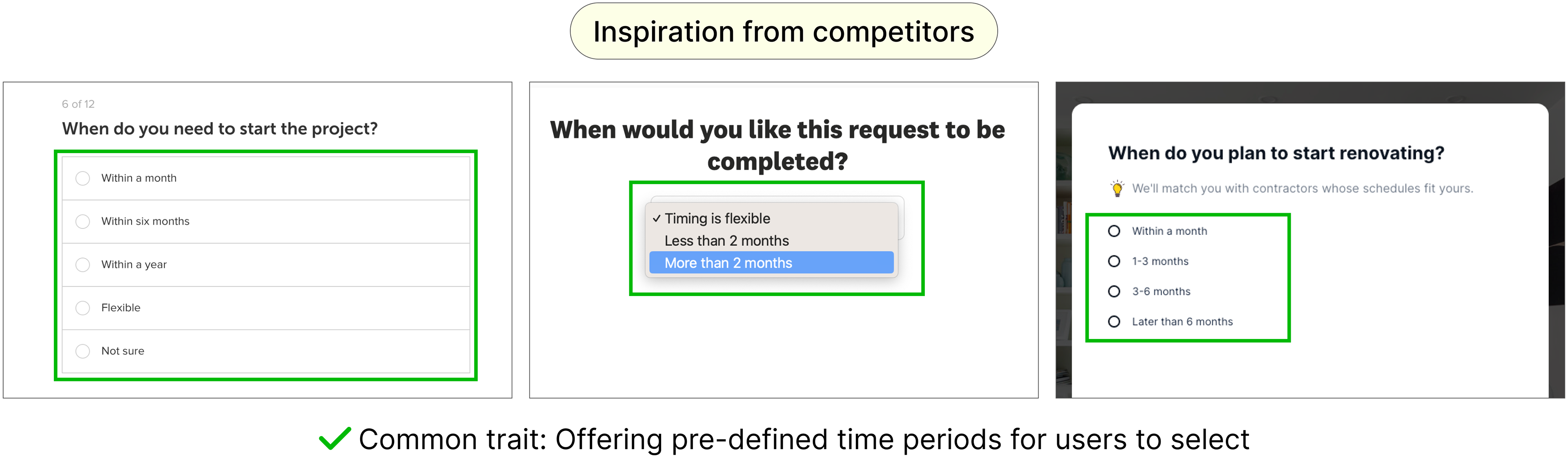
Their approach simplified date selection, reducing cognitive load for users who might be unsure of exact timelines. Incorporating this approach into our design would enhance usability and align with effective practices observed in the industry. If needed, we can gather feedback later and refine the survey questions to further improve the user experience.
I improved the form for mobile use, expecting contractors to access it while onsite. By breaking questions into separate pages, we minimized scrolling and simplified completion on their phones.
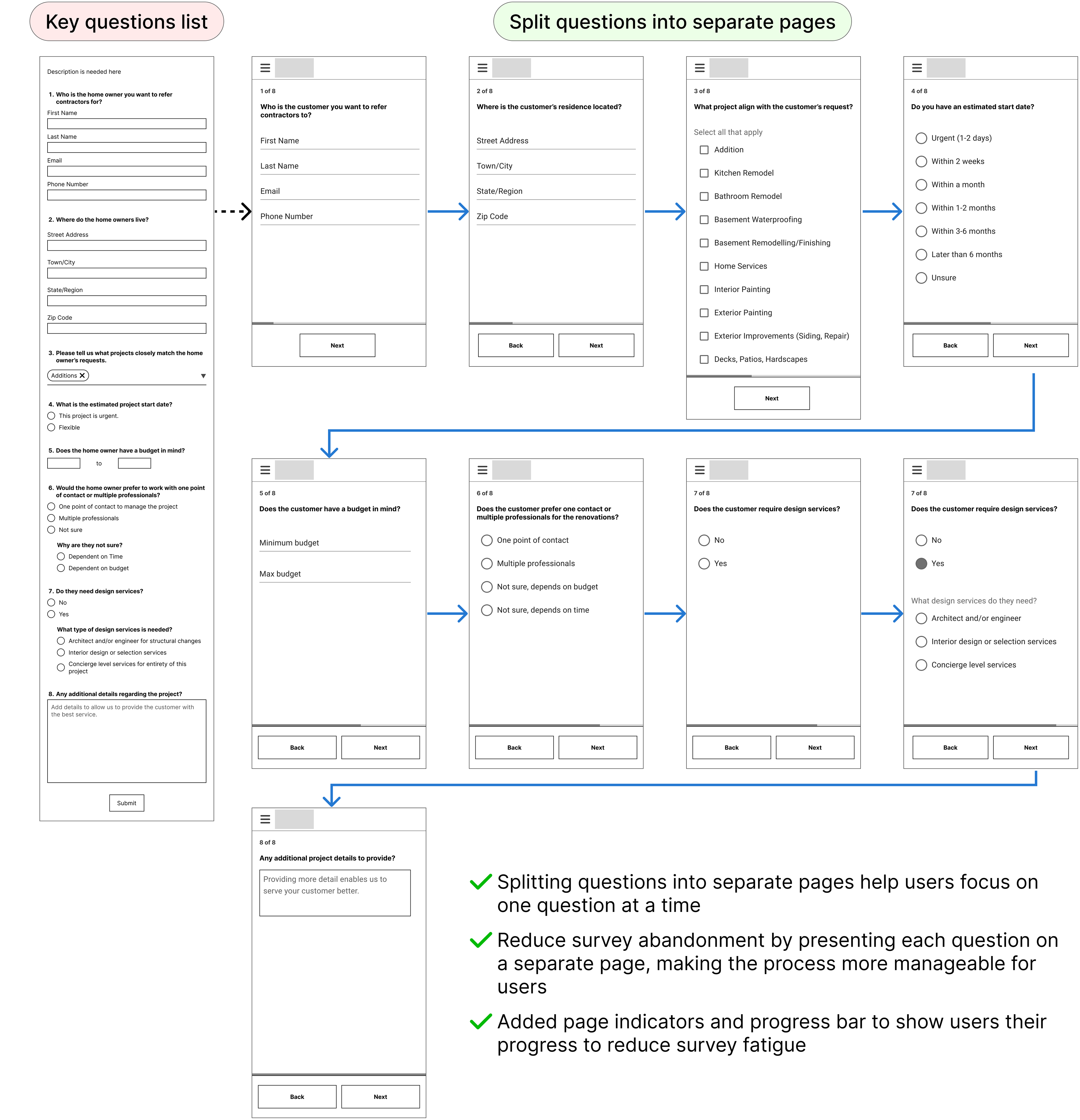
📔 Note: We initially started with this set of questions during this design phase. However, we further refined and reduced them based on ongoing discussions with clients throughout the project.
CSM view projects referred and Approve or Reject
I created a feature for CSMs to approve or reject referred projects, ensuring only those matched with suitable contractors proceed.
I created a feature for CSMs to approve or reject referred projects, ensuring only those matched with suitable contractors proceed.
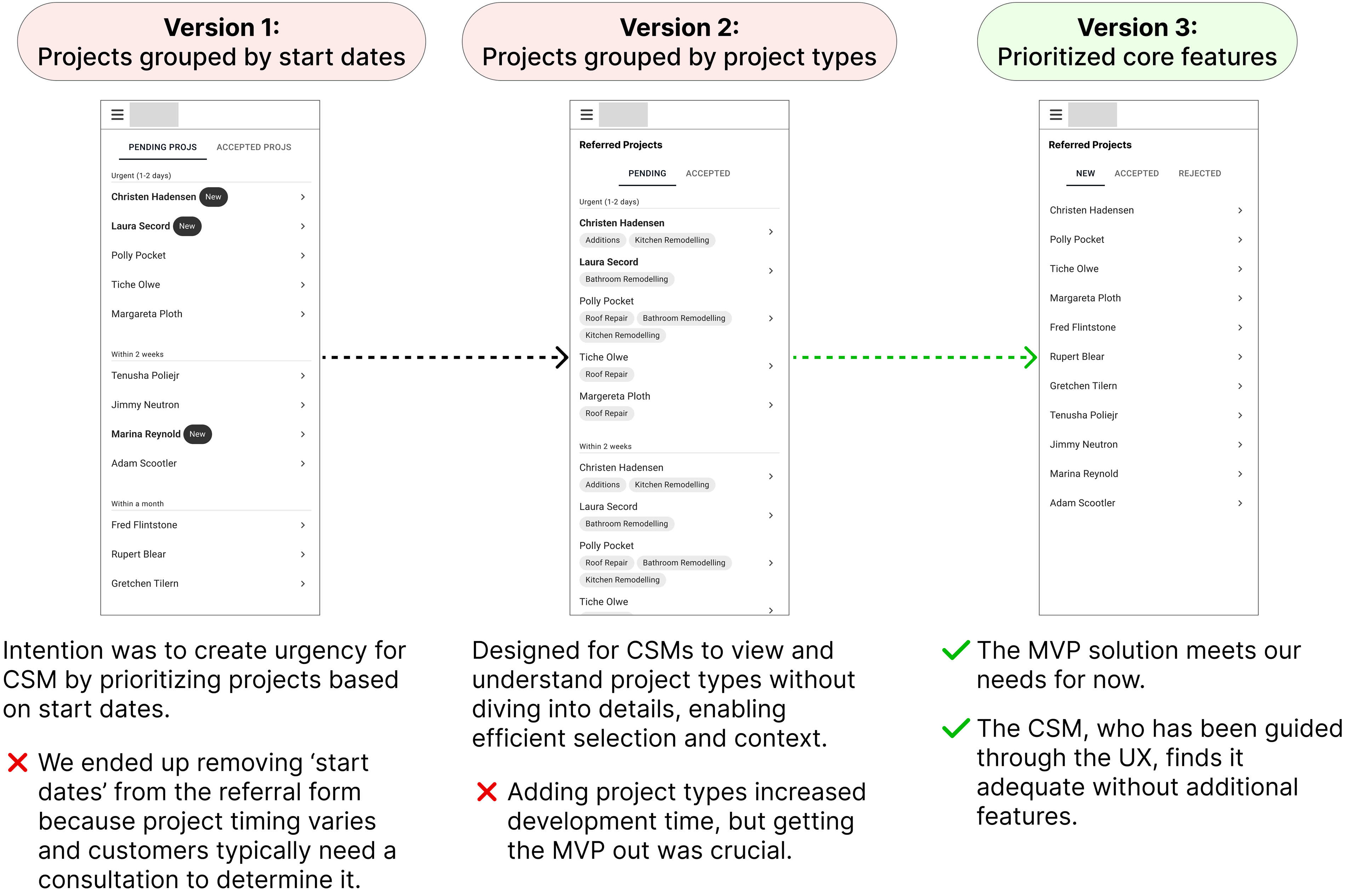
Project list:
Before enabling CSMs to approve or reject projects, they first needed access to the all the new projects sent to them.
Project details:
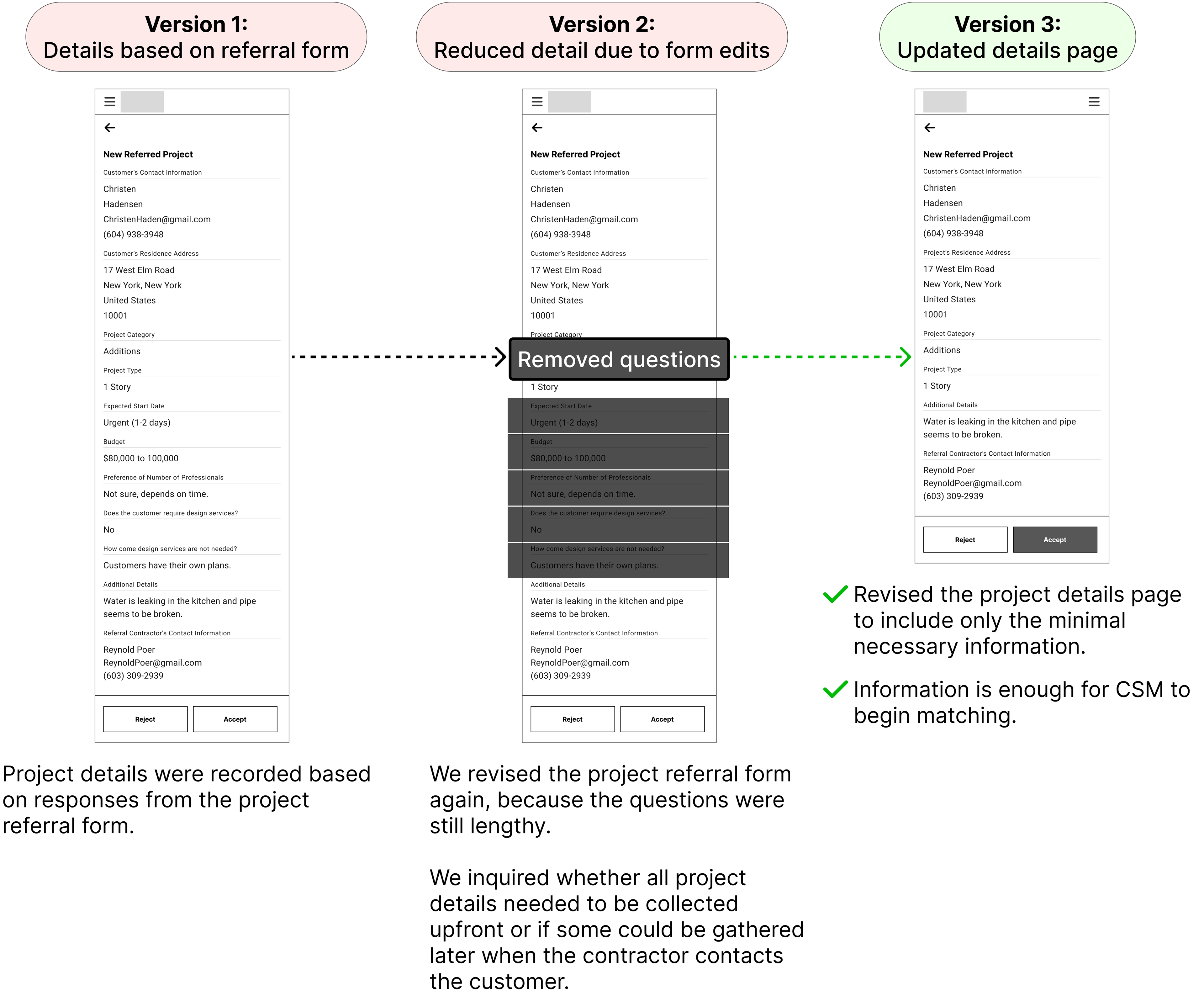
I adjusted the project details to match updates to the project referral form, aiming to improve form completion and data precision.
Accept or reject project details:
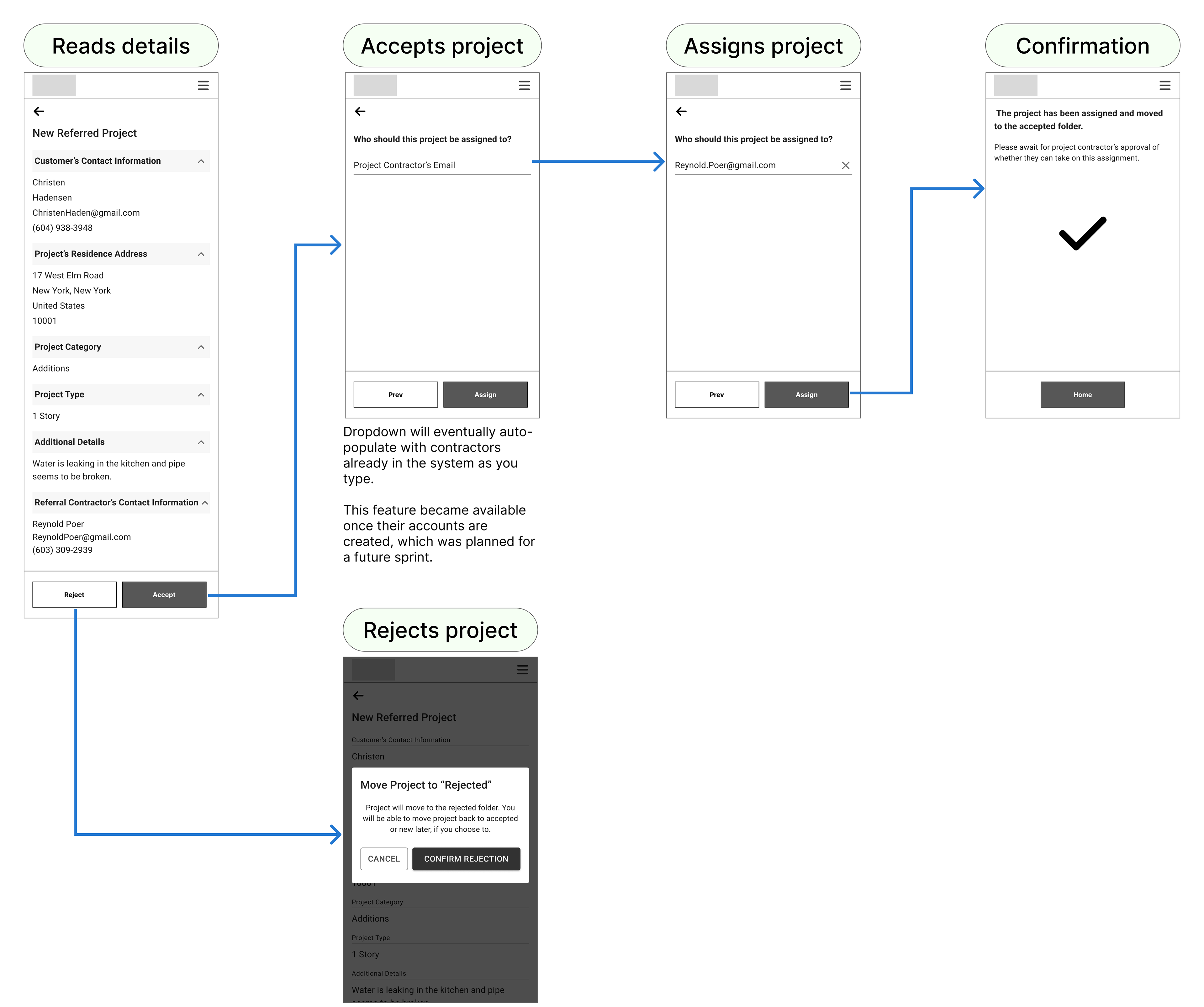
CSMs can choose to accept the project and match it with the best contractor or reject it.
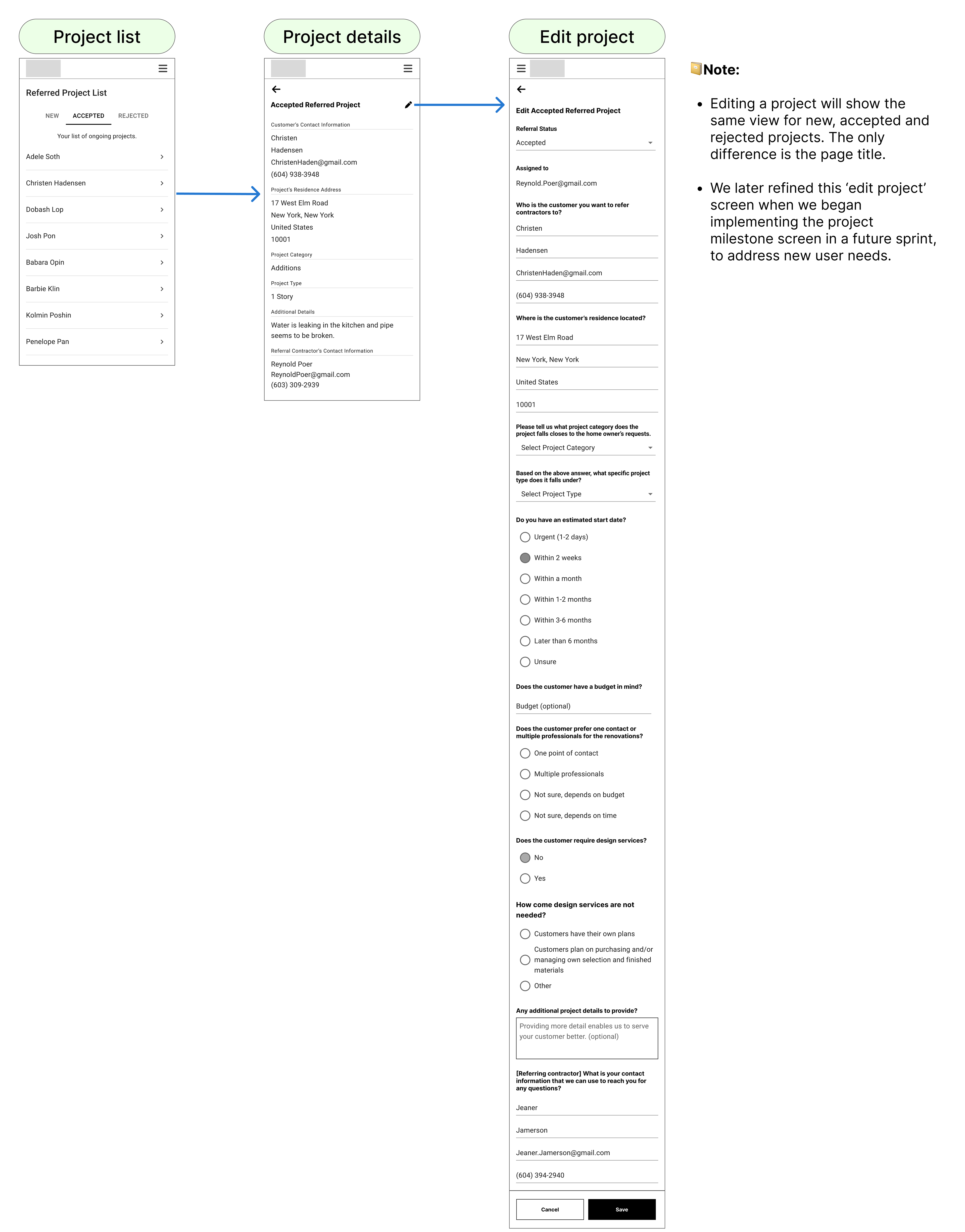
CSM edits project description
I allowed CSMs to edit project descriptions to keep information accurate and current. This improves communication, reduces misunderstanding and leads to better project outcomes.
I allowed CSMs to edit project descriptions to keep information accurate and current. This improves communication, reduces misunderstanding and leads to better project outcomes.
Sprint 3-4
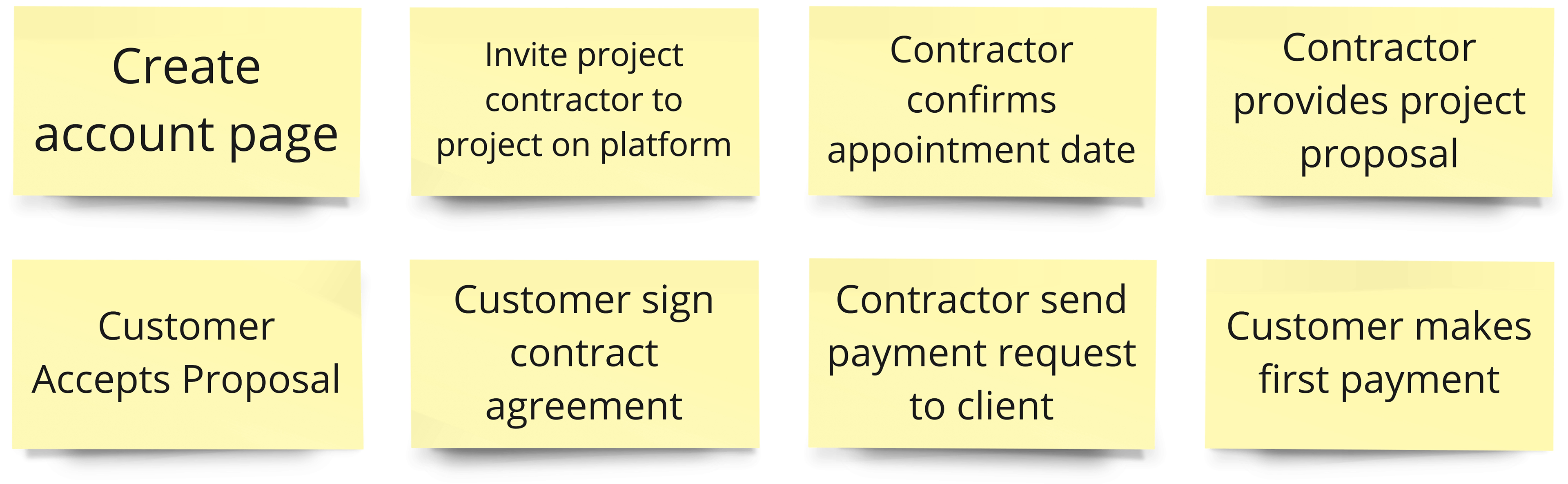
In Sprint 3-4, we prioritized key design features focused on account creation and project management, ensuring smooth interactions between contractors and customers.
Create account
I created account creation for contractors to store their information, simplifying the matching process.
Account creation would allow us to easily track and match contractors by auto-populating their details when we typed their information. This would streamline the matching process and make it easier to connect referral forms to the right contractors, significantly boosting efficiency and accuracy.
I created account creation for contractors to store their information, simplifying the matching process.
Account creation would allow us to easily track and match contractors by auto-populating their details when we typed their information. This would streamline the matching process and make it easier to connect referral forms to the right contractors, significantly boosting efficiency and accuracy.
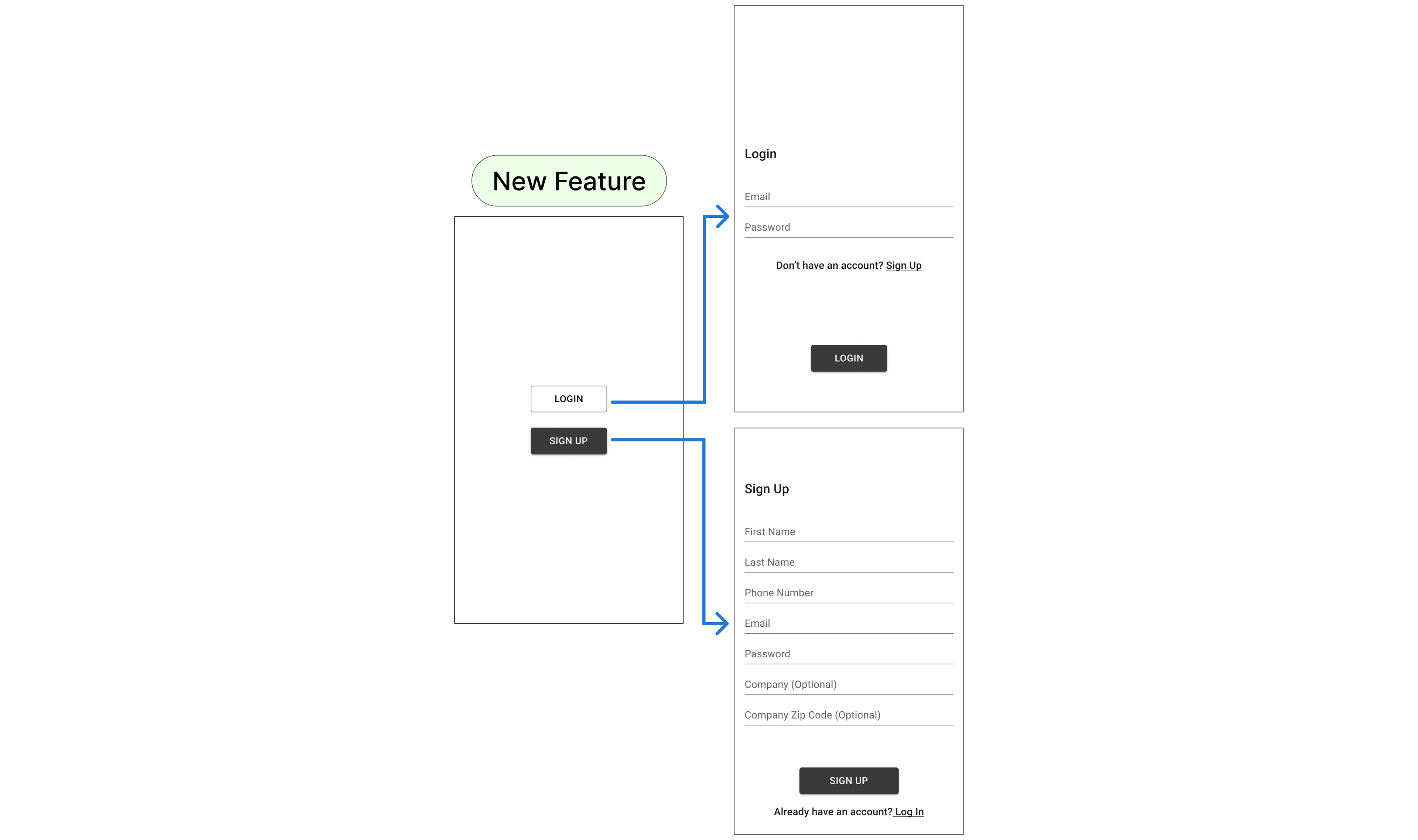
I want to emphasize that my primary focus on this project was UX rather than UI. I intentionally spent minimal time on the login feature to move quickly to the next feature, as the login functionality works. This agile approach was essential as I was the sole designer supporting a team of 4 developers. We aimed to test market assumptions rapidly, with the plan to address other UX revisions post-launch based on real-world feedback.
Invite project contractor to project on platform
We later repurposed the 'Sign Up' screen into an 'Add a Contractor' feature to enhance account security and control.
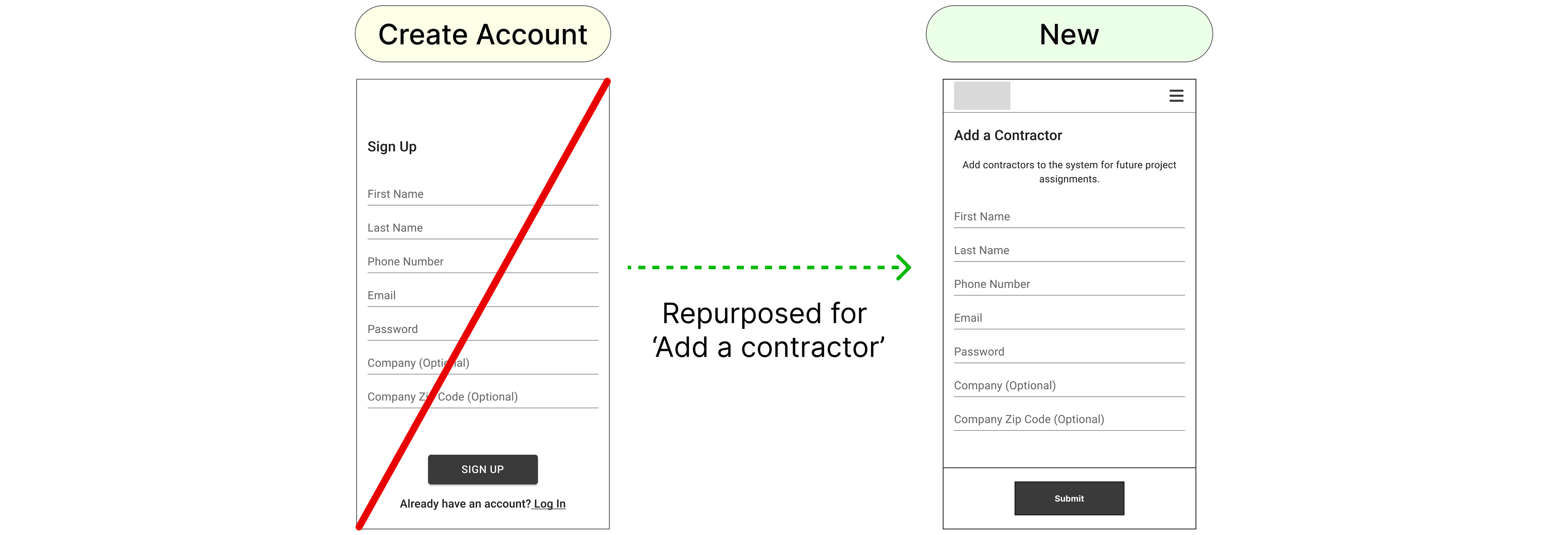
Initially, we developed a 'Sign Up' feature for Renolution, but after consulting the client, we pivoted to a model where CSMs create contractor accounts directly. We repurposed the 'Sign Up' screen into an 'Add a Contractor' screen to improve control and security. This change allowed us to better manage account creation, ensuring that only authorized contractors could join the platform. As a result, contractors receive an email to set their password and access their projects, leading to a more secure and streamlined onboarding process that aligns with client requirements."
Project Milestone
I identified that key tasks such as 'Contractor accepts project', 'Contractor confirms appointment date', and others were closely related as part of a unified process.
I identified that key tasks such as 'Contractor accepts project', 'Contractor confirms appointment date', and others were closely related as part of a unified process.
To streamline and enhance the user experience, I proposed consolidating these steps into a 'Project Milestone' feature. This integration allows for better tracking and management of the project's progress, making it easier for users to follow the process and ensuring that all critical steps are efficiently completed within a single, cohesive workflow.

As a result, I started looking at inspiration on how I can consolidate these steps together.
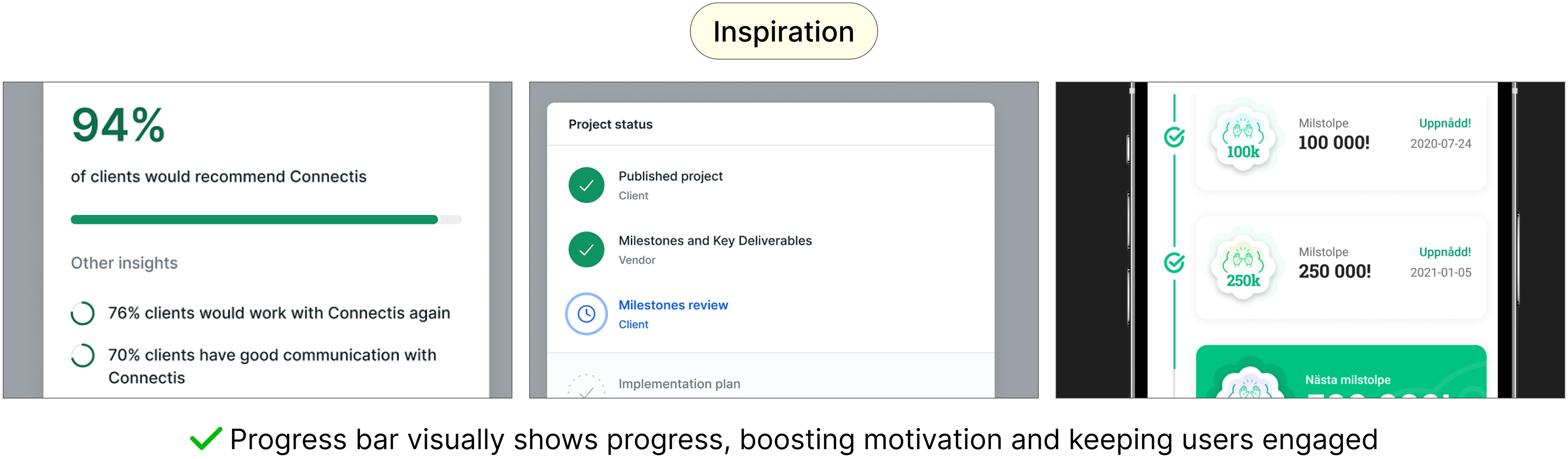
A progress bar effectively visualizes project completion, offering a clear view of progress and boosting motivation. Drawing from my experience in game design, where progress bars consistently engaged users by catering to visual learners, I utilized this approach to enhance project management. By showing task completion percentages, it helps users quickly grasp their progress, set expectations, manage timelines, and stay focused on their goals.
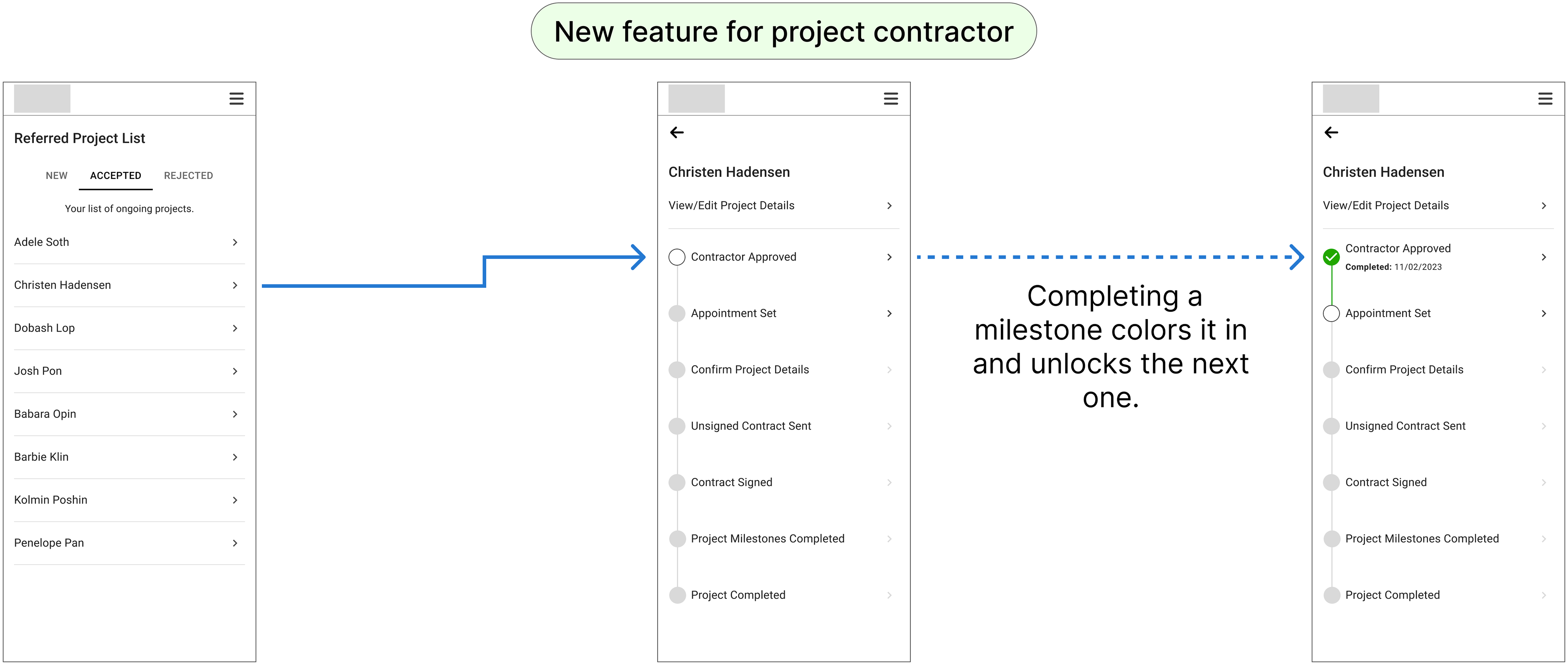
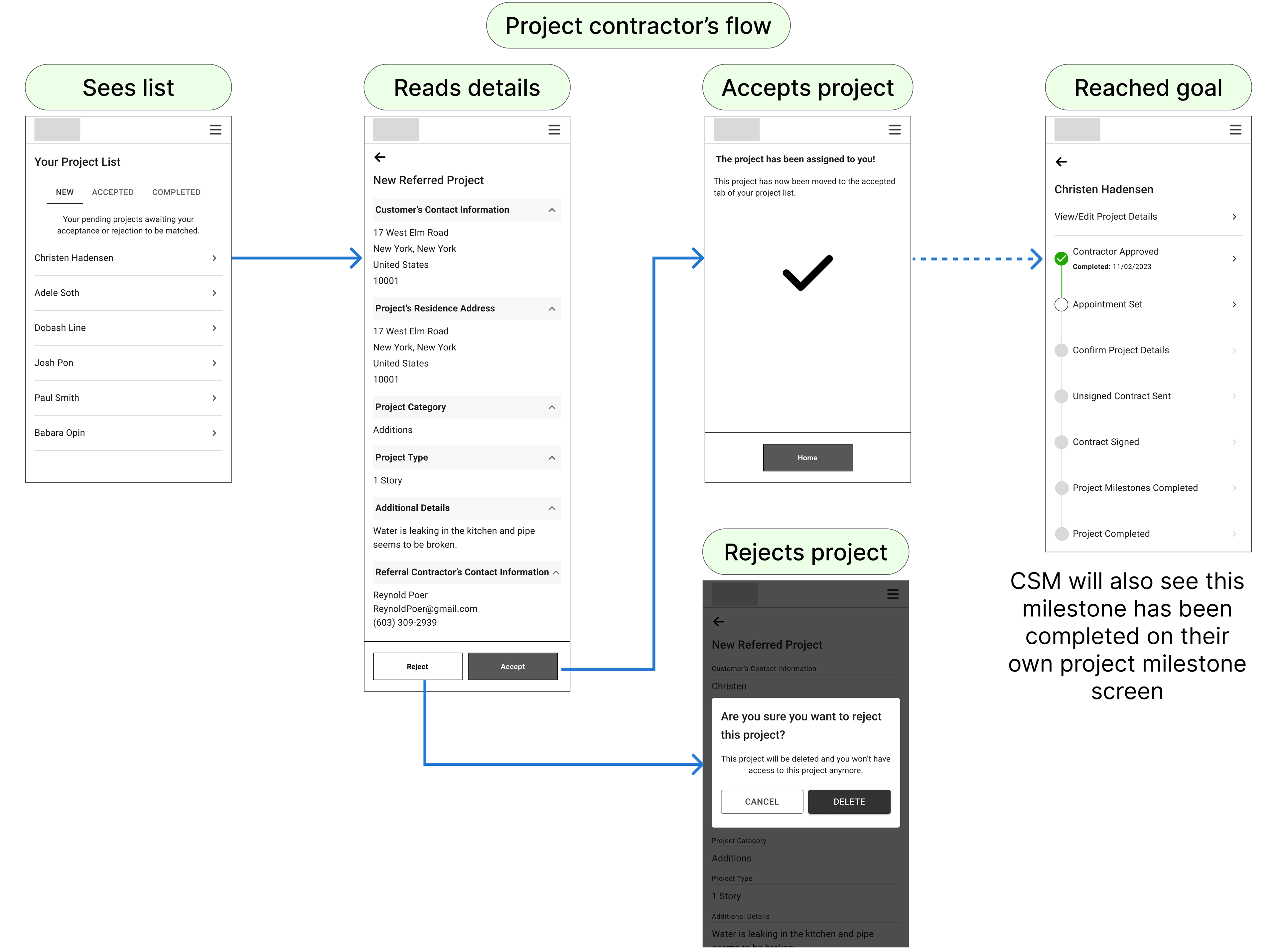
Contractor accepts project
I enabled contractors to review and accept assigned projects. This confirmation ensures their commitment to proceed and initiate the next phase of the project workflow.
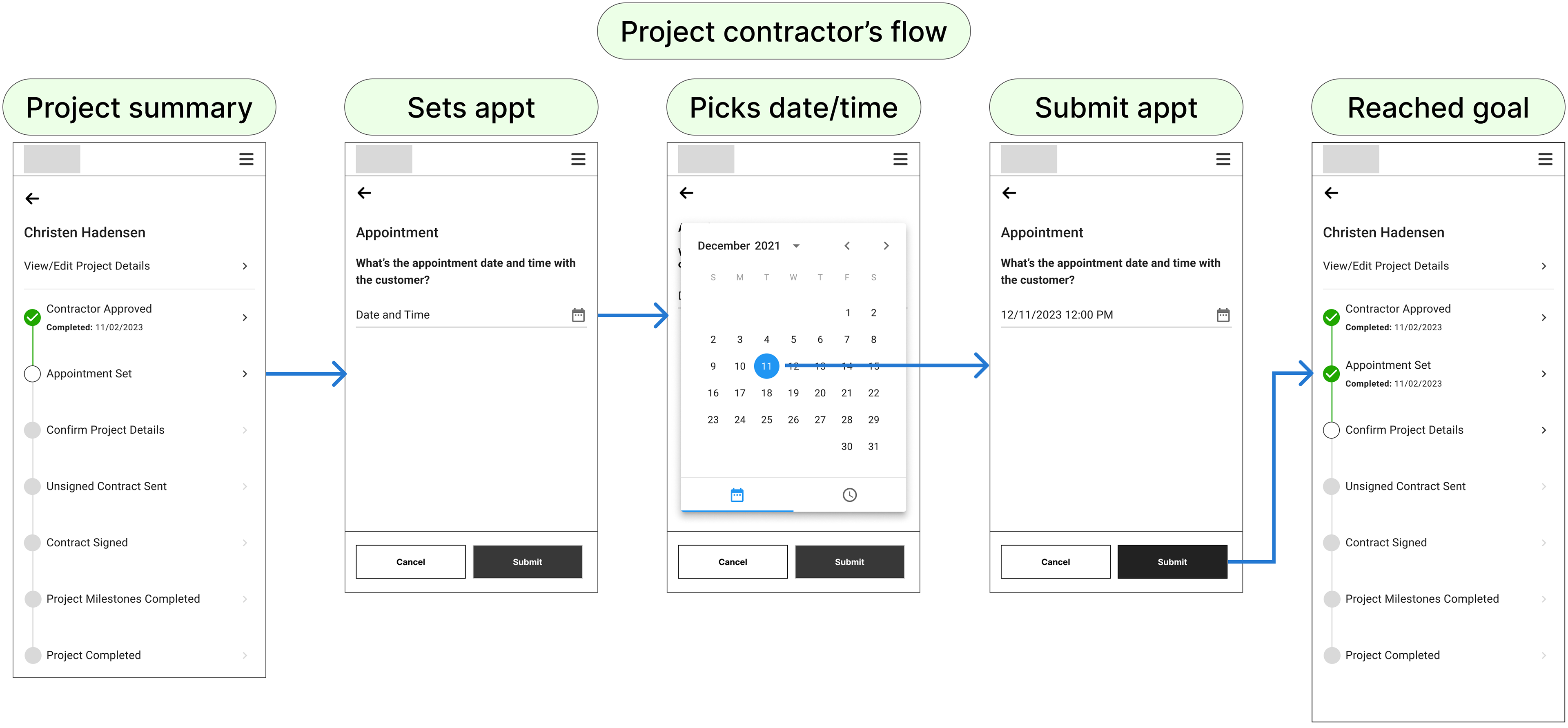
Contractor confirms appointment date
I designed a function for contractors to schedule initial project consultations, allowing CSMs to track appointment dates set with customers.
By requiring the contractor to confirm their appointment date with the customer, it allows the CSM to keep track of interactions, ensuring that meetings occur promptly. This feature also helps the CSM monitor the contractor's reliability and responsiveness, which are key factors in assessing their suitability for future projects. If appointments aren't confirmed or occur late, the CSM can intervene early, ensuring that the project stays on schedule and that high standards are maintained in contractor performance.
By requiring the contractor to confirm their appointment date with the customer, it allows the CSM to keep track of interactions, ensuring that meetings occur promptly. This feature also helps the CSM monitor the contractor's reliability and responsiveness, which are key factors in assessing their suitability for future projects. If appointments aren't confirmed or occur late, the CSM can intervene early, ensuring that the project stays on schedule and that high standards are maintained in contractor performance.
Contractor provides project proposal
We initially aimed to repurpose the 'Edit Project Details' feature, but found a need for specific project information for contractors at this stage.
We initially aimed to repurpose the 'Edit Project Details' feature, but found a need for specific project information for contractors at this stage.
We revised the 'Edit Project Details' to include fields for vision, scope, timeline, and budget. This allows contractors to capture crucial information during client meetings, ensuring they can draft more accurate contracts. By addressing these user needs, we improve proposal accuracy and project alignment, leading to clearer expectations and more effective project planning.
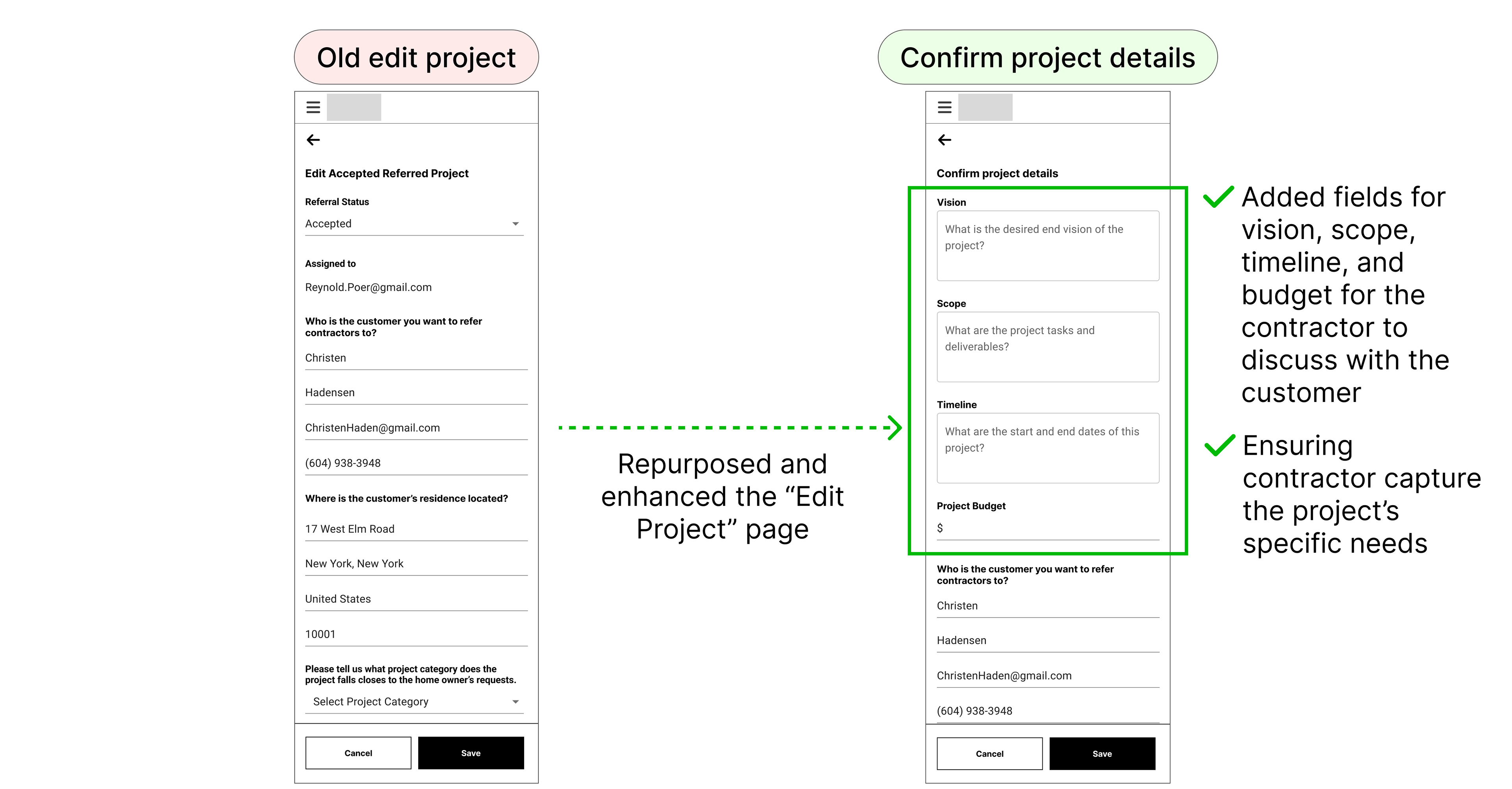
We were then able to add the newly revised page into the 'confirm project details' page as a milestone.
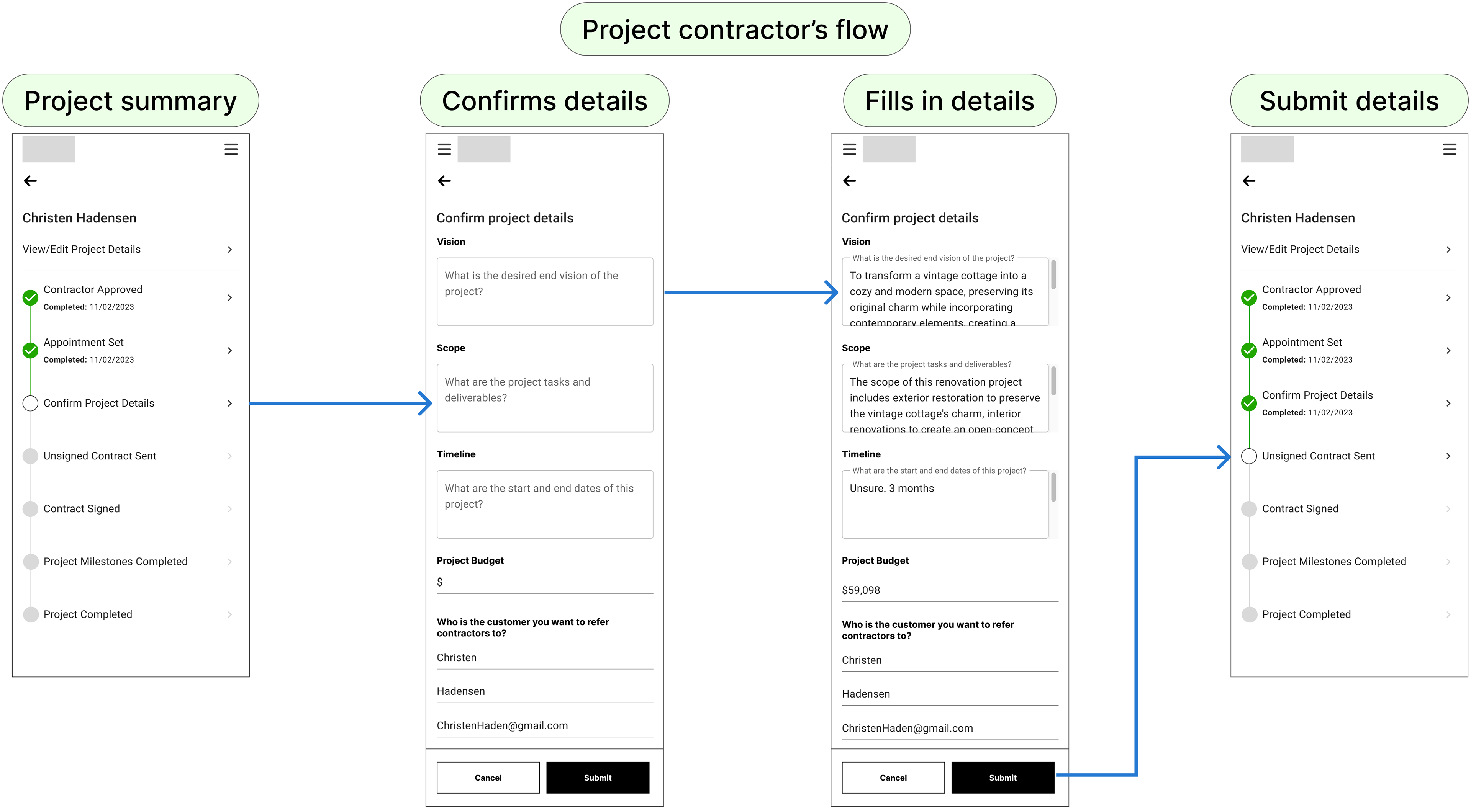
Contractor inputs date of contract sent
We decided against implementing a feature to send contracts directly to customers for signing. Instead, we chose a simpler approach where contractors submit the date they sent the unsigned contract.
This decision was made because we don't have a customer portal yet. We chose to deprioritize creating the customer flow due to time constraints and other priorities. The client wanted to focus on creating a CSM dashboard for desktop first. We agreed to revisit the customer-facing feature in a future engagement. This approach allowed us to meet immediate client needs while planning for future improvements.
We decided against implementing a feature to send contracts directly to customers for signing. Instead, we chose a simpler approach where contractors submit the date they sent the unsigned contract.
This decision was made because we don't have a customer portal yet. We chose to deprioritize creating the customer flow due to time constraints and other priorities. The client wanted to focus on creating a CSM dashboard for desktop first. We agreed to revisit the customer-facing feature in a future engagement. This approach allowed us to meet immediate client needs while planning for future improvements.
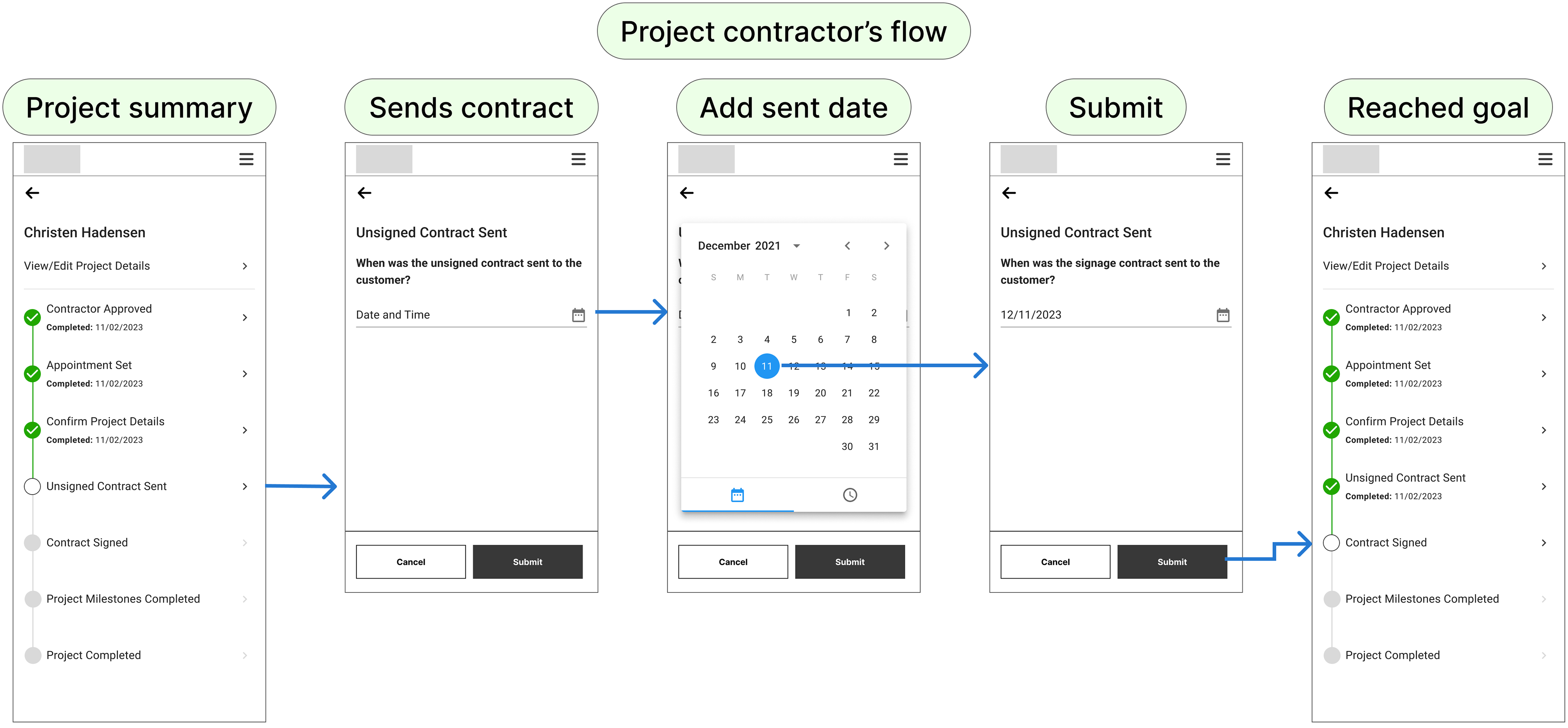
Client signs contract
I implemented a tool for contractors to upload signed contracts along with the contract date and value. This enables the CSM to monitor project progress and track the project's financial details, ensuring better oversight and management.
I implemented a tool for contractors to upload signed contracts along with the contract date and value. This enables the CSM to monitor project progress and track the project's financial details, ensuring better oversight and management.
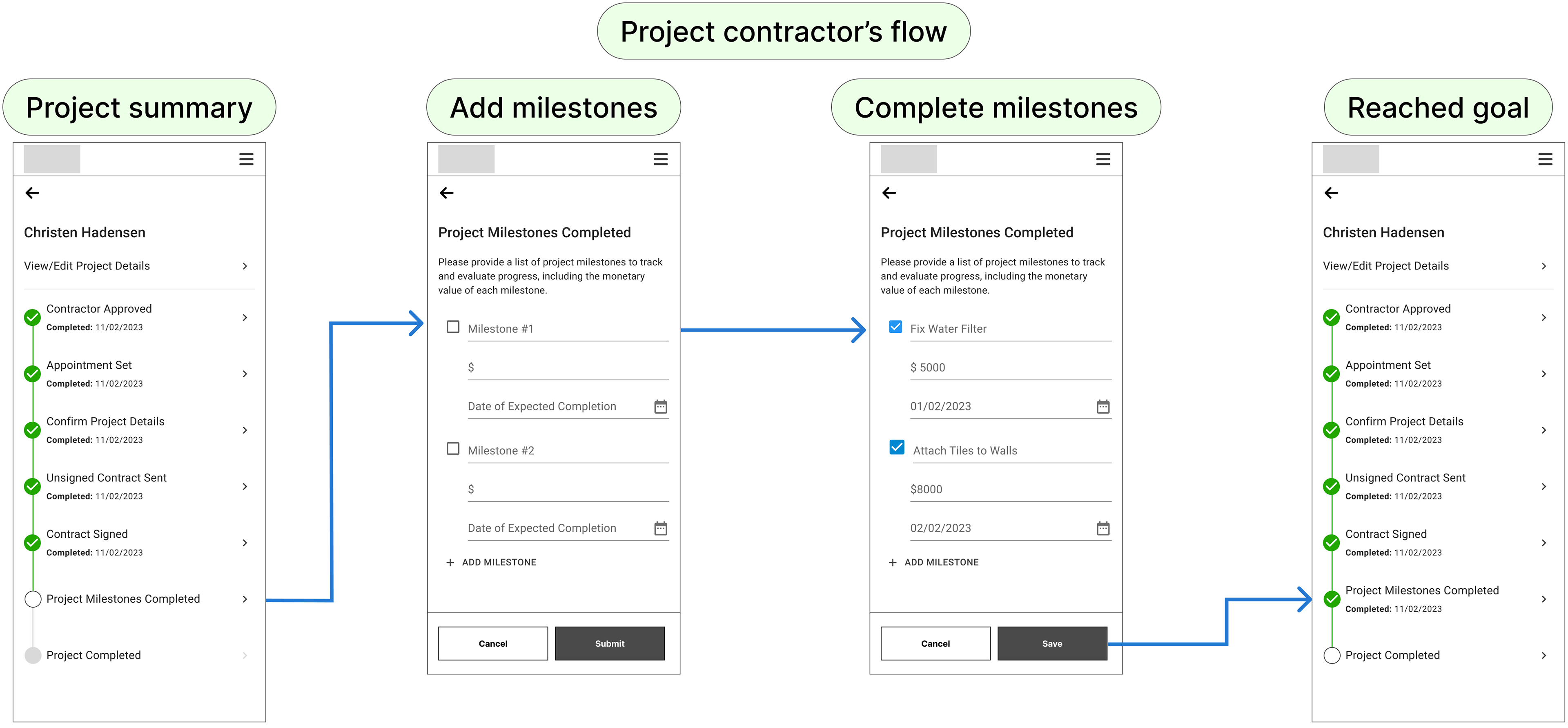
Contractor adds milestone to a project
I added the capability for contractors to set project milestones with costs and completion dates, helping CSMs track progress, manage budgets, and ensure timely delivery.
Similar to the iOS Reminders app, contractors can check off milestones as they are completed, with progress updating in real-time. This ensures clear tracking of project progress and financials, enhancing transparency and accountability.
I added the capability for contractors to set project milestones with costs and completion dates, helping CSMs track progress, manage budgets, and ensure timely delivery.
Similar to the iOS Reminders app, contractors can check off milestones as they are completed, with progress updating in real-time. This ensures clear tracking of project progress and financials, enhancing transparency and accountability.
Customer makes first payment
We prioritized the CSM dashboard for the MVP, deferring the invoice feature to a future phase, ensuring we delivered immediate value while planning for complex payment processes later.
We prioritized the CSM dashboard for the MVP, deferring the invoice feature to a future phase, ensuring we delivered immediate value while planning for complex payment processes later.
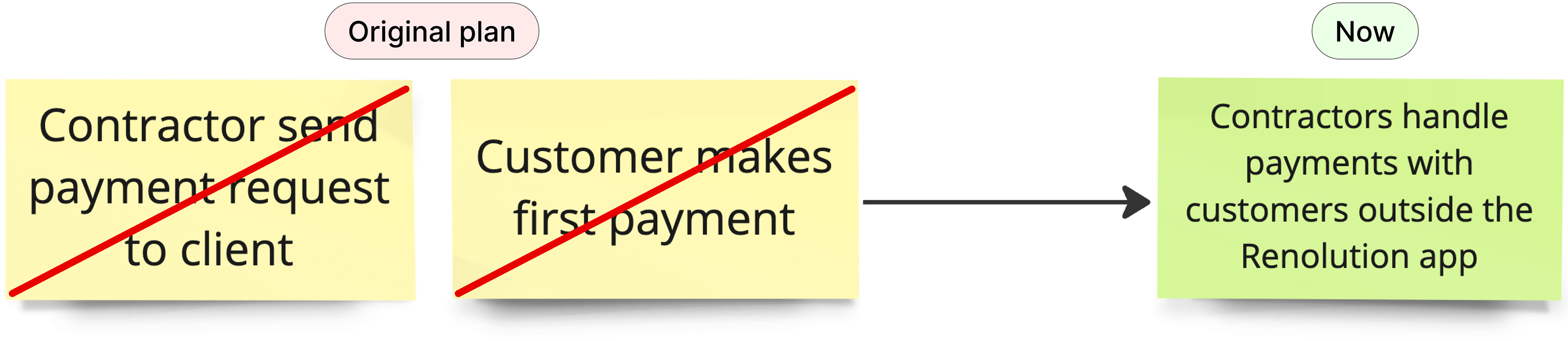
We initially planned to include an invoice feature in the project summary but prioritized the CSM dashboard for the MVP based on client needs. The invoice milestone was deferred to a future phase, allowing us to strategically focus on immediate value while planning for complex payment processes. This approach ensured that we delivered a targeted solution within scope, with future enhancements already in mind.
Project complete
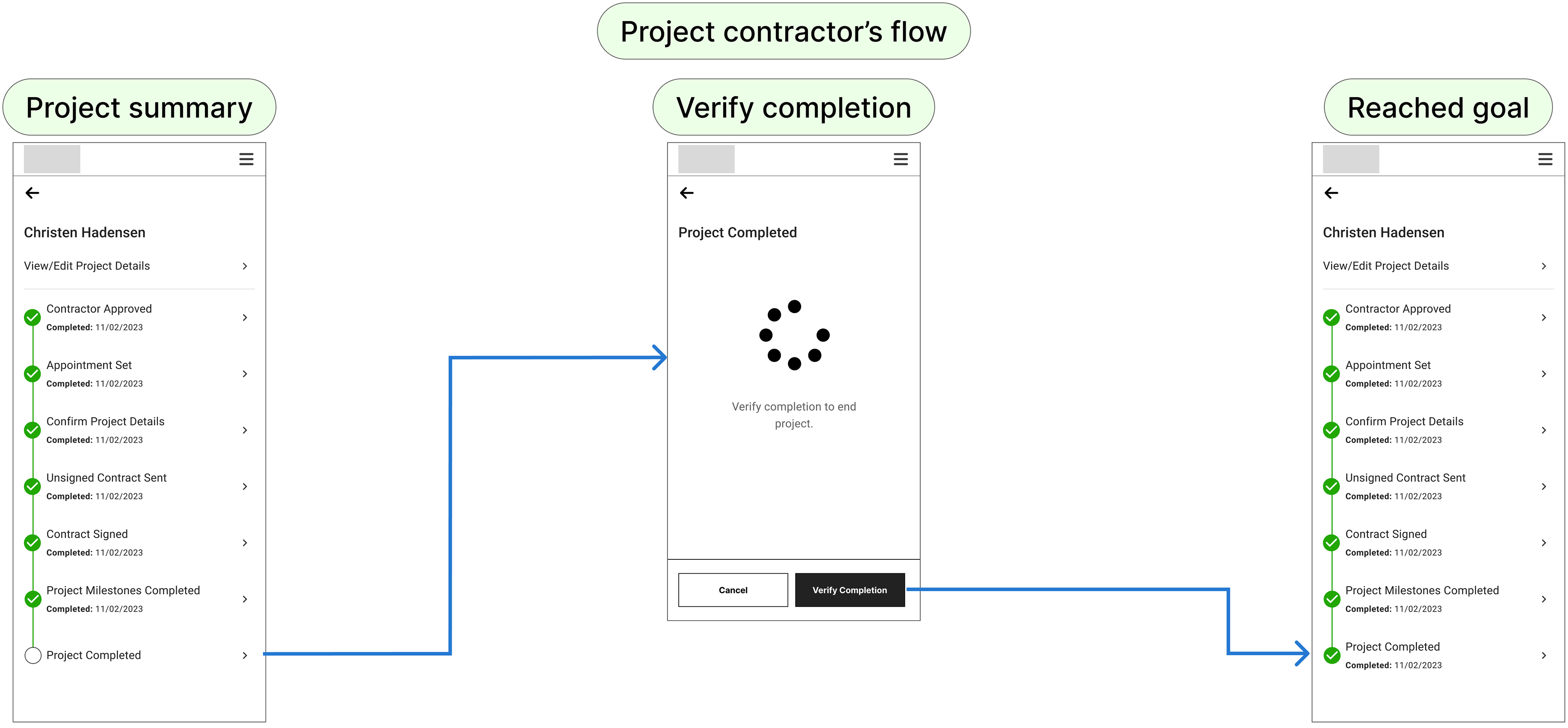
I implemented a verification step where contractors confirm project completion after payment. This allows CSMs to accurately track progress and ensure a seamless experience for all involved.
This verification ensures all milestones are met and aligns work with customer expectations, enabling the CSM to effectively monitor progress, maintain transparency, and resolve issues quickly, ensuring a smooth experience for both contractors and customers.
Sprint 5-6
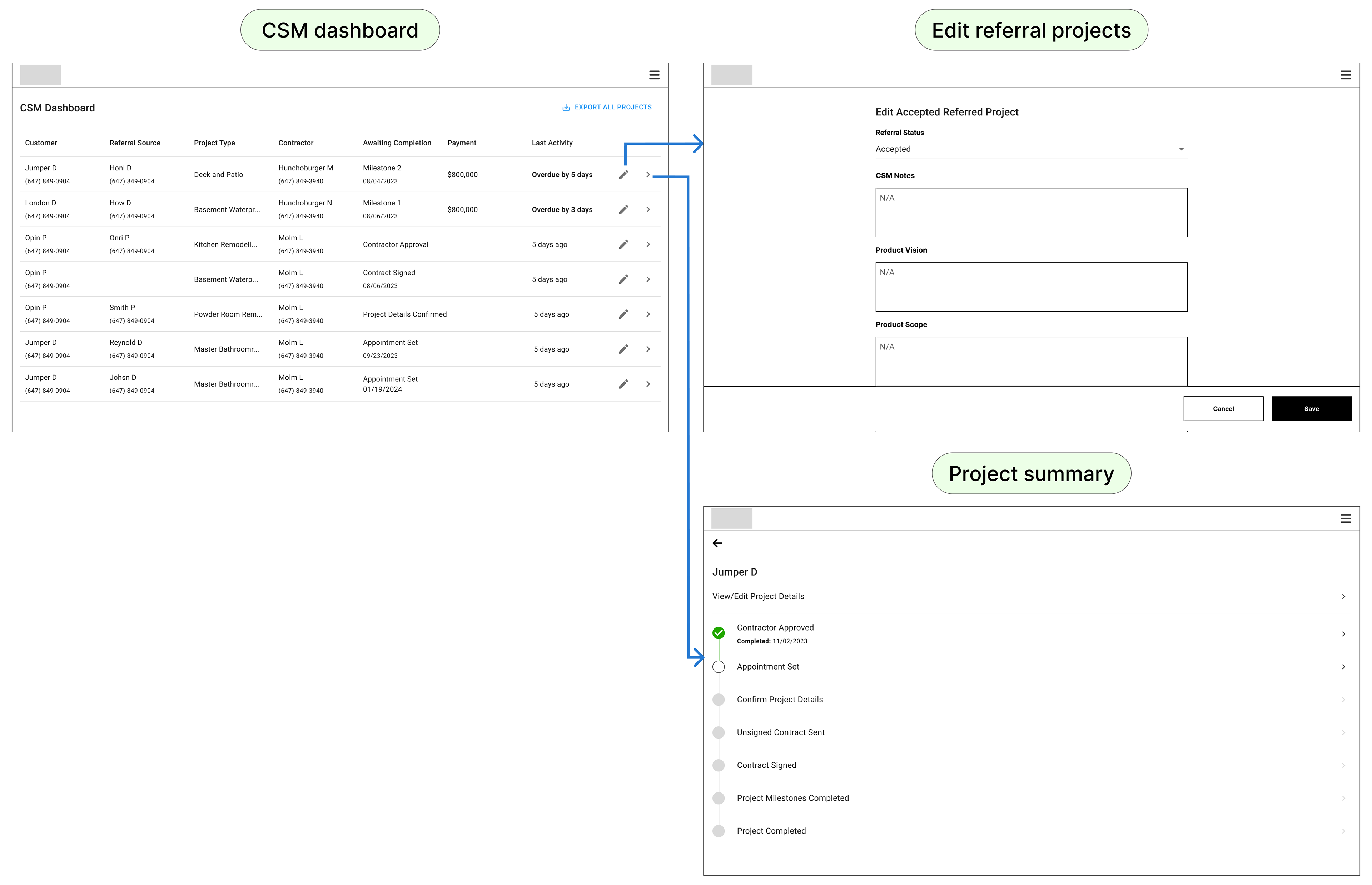
We prioritized the CSM dashboard over the customer portal to enhance desktop-based project management and transparency, addressing CSMs' need for better oversight and efficiency compared to their previous spreadsheet-based system.
We prioritized the CSM dashboard over the customer portal to enhance desktop-based project management and transparency, addressing CSMs' need for better oversight and efficiency compared to their previous spreadsheet-based system.
We prioritized the CSM dashboard over the customer portal because the CSMs primarily use desktop systems for project management, unlike contractors who rely on mobile apps for on-site work. CSMs were previously managing project progress and contractor availability using spreadsheets, which lacked transparency and efficiency. By focusing on developing the CSM dashboard, we provided a dedicated, transparent tool that consolidates project data, streamlines progress tracking, and enhances overall project oversight. This decision not only improved the CSMs' workflow but also addressed immediate needs for better visibility and management, setting the stage for more effective future enhancements like the customer portal.
The results
In just 6 weeks, we launched an MVP for MOSS that validated market assumptions and showcased significant potential for future growth and revenue, resulting in high satisfaction and improved operational efficiency.
Despite starting without performance benchmarks, our rapid development provided crucial insights into user behaviour and product effectiveness.
Despite starting without performance benchmarks, our rapid development provided crucial insights into user behaviour and product effectiveness.
✅ The MVP confirmed the product’s viability, showing promising engagement from contractors and significantly improving the CSM’s productivity.
✅ The new system streamlined project management, eliminating the need for spreadsheets and enabling the CSM to monitor progress more efficiently.
✅ The team’s swift execution and proactive approach were praised, leading to high satisfaction with the MVP’s performance.
No access to data
Although I didn't have access to Renolution's data, I would have analyzed metrics such as project referral form engagement and decision times, combined with user research, to enhance the user experience and ensure efficient decision-making.
Without access to Renolution's data, my focus would have been on analyzing key metrics to drive improvements. I would examine click-through rates on the project referral form to understand user engagement and identify any issues with form completion. Additionally, I would track how long users spend on project details before making decisions. If users take too long, it could indicate a need to improve the clarity and accessibility of the information. I would complement this analysis with user research to gather qualitative feedback and refine the user experience effectively.
Next steps:
1. Integrate terms and conditions into the account creation process, including details on fee percentages for referring and project contractors.
2. Develop a contractor management list with editing capabilities.
3. Create an onboarding form to capture contractor preferences and project needs.
4. Add a payment invoice feature to the project summary.